

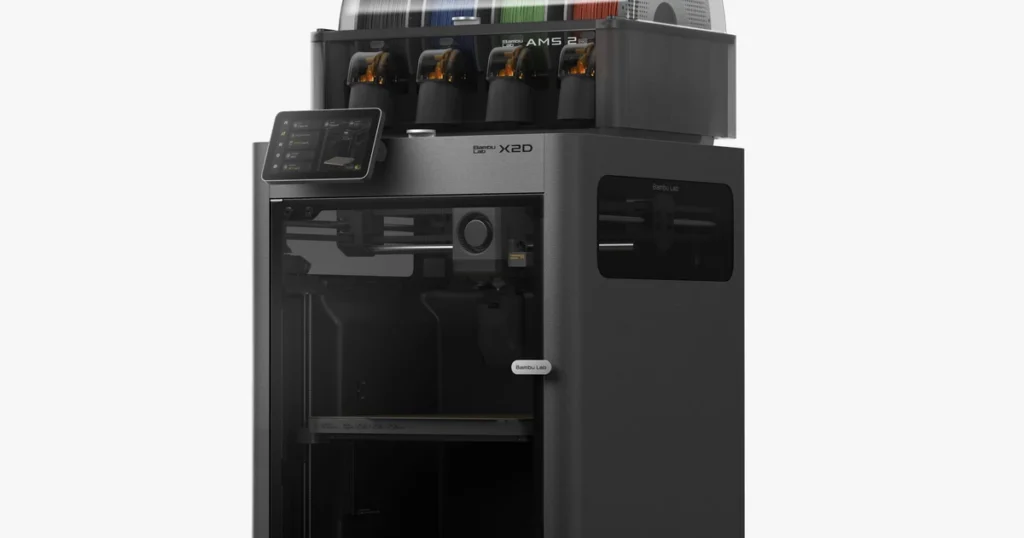
Choosing between the Bambu Lab X2D and the Bambu Lab P2S comes down to a clear technical distinction: pure single-extruder efficiency versus true dual-nozzle versatility.
The P2S delivers fast, dependable CoreXY printing for single-material builds and multi-color models via the automatic material system (AMS). The X2D introduces a dual-nozzle 3D printer architecture with active chamber heating designed to solve speed bottlenecks on dual-material jobs while tackling warp-prone engineering plastics.
While the Bambu Lab X2D price reflects its target market of active prosumers and engineering labs, the Bambu Lab P2S price offers an accessible entry point for everyday prototyping. Understanding whether the X2D vs P2S price difference aligns with your production volume requires examining build volume, material switching, running expenses, and print failure risks.
Related: Bambu Lab P1S vs P2S: Complete Comparison, Specs, Features, Speed & Is It Worth Upgrading? (2026)
X2D vs P2S: Key Differences at a Glance
To evaluate the bambu lab x2d vs p2s landscape accurately, review official hardware specifications side by side. Pricing reflects standalone setups versus bundle packages available at publication.
| Feature / Spec | Bambu Lab X2D (Standalone / Combo) | Bambu Lab P2S (Standalone / Combo) |
| Price (USD) | $649 (Standalone) / $899(AMS Combo) | $549 (Standalone) / $799 (AMS Combo) |
| Nozzle Configuration | Independent Dual Nozzle (IDEX System) | Single Nozzle (Swappable Hotend) |
| Build Volume (mm) | 256 x 256 x 256 mm (Nominal) | 256 x 256 x 256 mm |
| Max Nozzle Temperature | 300°C | 300°C |
| Max Heated Bed Temp | 120°C | 110°C |
| Chamber Heating | Active Chamber Heater (up to 65°C) | Passive Enclosure (Vent Fan Control) |
| Max Toolhead Speed | 1000 mm/s | 1000 mm/s |
| Max Toolhead Acceleration | 20,000 mm/s² | 20,000 mm/s² |
| Multi-Material Workflow | Dual Nozzle Direct Swapping + AMS Support | Single Nozzle Purge/Retract + AMS |
| Physical Dimensions & Weight | 392 x 406 x 478 mm / 16.25 kg | 386 x 389 x 458 mm / 14.1 kg |
What Is the Difference Between the X2D and P2S?
Understanding what is the difference between x2d and p2s starts with mechanical layout rather than raw speed figures. Both machines sit inside the desktop CoreXY category, but they handle multi-material feeding, heat retention, and spatial clearance differently.
| Print Toolhead Architecture | Bambu Lab P2S (Single Nozzle) | Bambu Lab X2D (Dual Nozzle) |
| Toolhead Layout | Single Nozzle Assembly | Nozzle A + Nozzle B Dual Assembly |
| Filament Switch Mechanism | Requires filament purge and retract via AMS | Direct tool swapping without purge waste for 2 materials |
Single-nozzle vs dual-nozzle printing
The structural pivot point in any x2d vs p2s comparison is the printhead. The P2S relies on a single-nozzle 3D printer hotend. When printing a model that mixes standard plastic with dedicated breakaway filament, the P2S must cut the primary strand, retract it out of the toolhead, feed the secondary material from the automatic material system (AMS), heat the block to the secondary temperature, and flush residue into a purge tower. A model with 400 layer swaps incurs 400 purge cycles, multiplying job runtimes and generating significant filament purge waste.
The X2D uses an independent dual-nozzle 3D printer carriage. When shifting between primary build filament and support material for 3D printing, the printhead simply parks one nozzle and lowers the second into place. The secondary nozzle remains pre-heated, eliminating line-retraction cycles and purging steps for dual-material jobs. This design turns hours of wasted toolhead travel into active printing time.
Build volume, speed, and temperature
When looking at x2d vs p2s build volume, both list a nominal print space of 256 x 256 x 256 mm. However, real-world slicing constraints differ. On the X2D, slicing models using both toolheads reduces usable X-axis width by roughly 12 to 18 mm along the parking margins to prevent nozzle collision. Single-nozzle operations on the X2D preserve the full 256 mm stroke.
Evaluating x2d vs p2s print speed highlights a common trap. Both printers claim 500 mm/s max linear velocity and 20,000 mm/s² acceleration. Single-material bench tests produce nearly identical completion times on both machines. Real throughput diverges on complex multi-material parts. The P2S spends considerable time traveling to the purge block and executing retraction steps, whereas the X2D spends almost its entire operational cycle extruding polymer.
Thermal capabilities separate the two models further. The P2S uses a passive enclosure that traps ambient bed heat up to roughly 45°C. The X2D features a heated chamber 3D printer construction with dedicated 300W heating elements that stabilize internal air temperatures up to 65°C, while pushing nozzle temperatures to 300°C and bed temperatures to 120°C.
Related: 3D Printer Nozzle Clogged? Here’s How to Fix It Quickly
AMS and material-switching workflow
Comparing x2d vs p2s for multi material printing reveals complementary approaches to material management. The P2S connects directly to a single AMS unit, allowing automatic material switching for four colors or filament types through one hotend. Expanding to sixteen colors requires daisychaining four AMS units via a hub.
The X2D pairs its dual-nozzle hardware with AMS integration. One nozzle handles multi-color combinations fed through an AMS unit, while the second dedicated nozzle holds flexible TPU or dense support materials like soluble support filament that typically jam automatic multiplexers. This dual-route workflow prevents abrasive support filaments from wearing out main color paths.
Print Quality, Materials, and Performance
Evaluating x2d vs p2s print quality requires assessing mechanical rigidity alongside thermal management across different filament types.
PLA and PETG printing
For everyday visual models, decorative prints, and basic enclosures, PLA vs PETG printing yields clean, reliable output on both machines. The CoreXY motion system keeps layer lines precise on both platforms.
The P2S handles standard materials cleanly with minimal setup. The X2D provides identical surface finish on basic PLA and PETG parts, meaning buyers who print standard decorative items gain little benefit from the X2D’s higher price tag.
ABS, ASA, and engineering filaments
Printing high-temp engineering polymers introduces warping risks caused by thermal contraction. Evaluating x2d vs p2s for engineering filaments highlights clear hardware advantages for the X2D.
ABS and ASA 3D printing requires stable environmental heat. The P2S can print moderate ABS parts using its passive enclosure, but large-footprint models often warp or experience layer delamination as ambient temperatures fluctuate. The X2D maintains an active 65°C chamber temperature, stabilizing internal air, preventing corner lifting, and improving interlayer adhesion on dense polycarbonate (PC) and nylon (PA) prints.
| Polymer Type | Bambu Lab P2S Performance | Bambu Lab X2D Performance | Recommendation |
| PLA / PETG | Excellent surface quality; fast cooling. | Excellent surface quality; fast cooling. | P2S (Equal quality at lower cost) |
| ABS / ASA | Moderate success; prone to warping on wide bases. | Excellent; active chamber eliminates warping. | X2D |
| PA / PC | Marginal; nozzle caps at 300°C, passive ambient heat. | Strong; 300°C nozzle + 65°C chamber heat. | X2D |
| TPU (Flexibles) | Single material prints via direct drive top-load. | Dual material support; dedicated flexible path. | X2D |
Support materials and multi-material printing
Support removal impacts post-processing labor. The single-nozzle P2S can extrude interface support materials, but passing build plastic and support material through the same nozzle forces broad temperature swings at every swap. Residual PVA or support polymer trapped inside the hotend can degrade main model strength or cause nozzle clogs.
The X2D routes primary structural filament through toolhead A and dedicated soluble support filament or breakaway support material through toolhead B. Maintaining separate temperature zones eliminates cross-contamination and delivers clean undersides on complex overhangs.
X2D vs P2S: Price and Running Costs
A realistic evaluation of x2d vs p2s running costs goes beyond initial purchase price. Operating budget considerations must account for material efficiency, power consumption, and replacement parts.
| Total Cost of Ownership (TCO) Dimension | Bambu Lab P2S | Bambu Lab X2D |
| Initial Hardware Capital | $549(Standalone) / $799 (Combo) | $649 (Standalone) / $899 (Combo) |
| Consumables & Waste | Up to 30% higher purge waste on multi-material jobs | Zero purge waste on 2-material dual nozzle jobs |
| Maintenance & Power Draw | Single swappable hotend; lower power draw | Dual hotends & active 300W heater; higher power draw |
Upfront Capital and Bundles
Analyzing x2d vs p2s price metrics requires matching configuration tiers:
- Standalone Units: The Bambu Lab P2S price starts at $549, whereas the Bambu Lab X2D price lands at $649. The X2D vs P2S price difference sits at $100 for baseline hardware.
- Combo Packages: Adding an AMS unit brings the P2S Combo to $799 and the X2D Combo to $1899.
Operational Consumables and Waste
Filament usage varies significantly on multi-material builds. The single-nozzle P2S generates filament purge waste on every color or support swap. On intricate multi-color parts, purge volume can equal or exceed model mass.
The X2D eliminates toolhead purging on two-material jobs, saving material on every build. Over hundreds of printing hours, those material savings narrow the initial price gap for prosumer shops running frequent support-heavy jobs.
Related: 10 Best 3D Printers for Small Businesses to Start Making Money in 2026
Power, Maintenance, and Tool Wear
The X2D draws additional power to run its 300W active chamber heater, leading to higher electricity consumption than the P2S during long ABS or PA print runs. Maintenance demands also scale with hardware complexity. The X2D contains dual heating blocks, dual ceramic heaters, and extra alignment linkages that require periodic inspection compared to the single swappable hotend on the P2S.
Which Printer Is Better for Different Users?
Deciding is the x2d worth it over p2s depends entirely on your target applications, production volume, and material preferences.
| User Profile | Recommended Printer | Key Selection Rationale |
| Hobbyist & Casual Creator | Bambu Lab P2S | Lower purchase cost, simple operation, high-speed PLA/PETG output. |
| Multi-Color Designer | Bambu Lab P2S Combo | AMS integration handles multi-color visual models efficiently. |
| Engineering Prototyper | Bambu Lab X2D | Heated chamber handles warping on ABS, ASA, and nylon structural parts. |
| Low-Volume Manufacturer | Bambu Lab X2D | IDEX setup drops print times and filament waste on dual-material jobs. |
Who should buy the X2D?
The X2D fits professional engineering environments, design studios, and active prosumers printing functional components. If your workflow relies heavily on ABS, ASA, PC, or carbon-fiber reinforced nylons, active chamber heating helps deliver warp-free parts. It is also ideal for production runs requiring dense soluble supports, where dual nozzles cut print times and reduce material waste.
Who should buy the P2S?
The P2S is the logical choice for beginners, hobbyists, educational labs, and prop makers. It delivers top-tier print speeds, crisp surface details, and full access to the AMS ecosystem for multi-color models without forcing users to manage dual-nozzle offsets. If you print primarily in PLA, PETG, or standard TPU, the P2S offers outstanding value.
Should You Buy a 3D Printer or Outsource Your Parts?
Purchasing desktop hardware requires balancing initial machinery costs against maintenance time, operating noise, power draw, and print failure risks. For many businesses, buying equipment is only part of the equation.
| Feature / Consideration | In-House (X2D / P2S) | Outsourced (Lava3DP) |
| Capital Investment | Upfront Hardware Capital | Zero Capital Expenditure |
| Maintenance & Setup | Machine Maintenance & Tuning | Industrial SLA / SLS / MJF |
| Material Options | Limited Material Scope | Enterprise Engineering Resins |
| Labor & Scalability | Operator Time & Calibration | On-Demand Batch Scaling |
When evaluating total cost, consider using a professional 3D printing service like Lava3DP. Outsourcing functional parts or prototypes eliminates setup headaches, equipment wear, and material storage demands. A custom 3D printing service provides access to industrial technologies like Selective Laser Sintering (SLS) or Stereolithography (SLA) that exceed desktop FDM capabilities.
Utilizing a 3D printing prototype service lets product teams test complex geometry, high-temp nylon, or rubber-like elastomers before investing in in-house machinery.
When production calls for hundreds of custom 3D printed parts, relying on an established partner delivers consistent tolerances without tying up internal labor. Evaluating realistic 3D printing service cost metrics often proves that outsourcing is the most cost-effective path for short-run manufacturing.
Ready to Manufacturing with LAVA3dp?
Upload your CAD file today and receive instant pricing, expert engineering support, fast production, and worldwide delivery.
Get an Instant Quote →Final Verdict: X2D vs P2S
The Bambu Lab P2S remains the benchmark for high-speed single-extruder 3D printing, offering incredible performance and multi-color flexibility via the AMS at an accessible price.
The Bambu Lab X2D earns its premium through active chamber heating, 300°C high-temp extruders, and an independent dual-nozzle setup that excels at technical polymers and dual-material printing. Match your choice to your core material needs—or partner with external manufacturing experts when project demands exceed desktop capabilities.
FAQs
What is the main difference between the Bambu Lab X2D and P2S?
The primary difference lies in printhead architecture and thermal management. The X2D uses an independent dual-nozzle system with an active chamber heater up to 65°C. The P2S uses a single-nozzle printhead inside a passively enclosed chamber. These mechanical differences allow the X2D to print dual-material models faster without purging filament, while stabilizing high-temperature engineering plastics against warping.
Is the Bambu Lab X2D worth the extra money over the P2S?
The X2D justifies its higher price for users who regularly print structural parts using ABS, ASA, PC, or nylon, or those who rely on soluble support material for complex overhangs. The active chamber heat and independent toolheads reduce job times and prevent warping on engineering filaments. For users printing primarily PLA, PETG, or standard multi-color models, the P2S offers nearly identical surface finish at a much lower cost.
Is the X2D faster than the P2S?
On single-material prints, both machines share identical top speeds of 500 mm/s and acceleration rates of 20,000 mm/s². On multi-material or dual-color parts requiring two filaments, the X2D is significantly faster because its dual nozzles swap toolpaths directly without waiting to retract, purge, and reload filament through a single nozzle like the P2S.
Which printer is better for multi-material 3D printing?
It depends on whether you prioritize color variety or multi-material efficiency. The P2S paired with an AMS handles up to four colors through a single hotend by purging between color changes. The X2D uses two separate nozzles, allowing it to combine two materials—such as rigid plastic and soluble support—without purge waste. Combining the X2D with an AMS provides both toolhead swapping and multi-color capability.
Can the X2D and P2S print ABS and ASA?
Both printers can process ABS and ASA, but the X2D handles them far more reliably. ABS and ASA contract as they cool, leading to corner lifting and layer splits. The X2D’s 65°C active chamber heater holds surrounding air at a steady temperature to prevent warping on large models. The P2S relies on passive chamber heat, which works for smaller ABS items but struggles on wide-footprint parts.
Do the X2D and P2S have the same build volume?
Both printers list a nominal build volume of 256 x 256 x 256 mm. However, when slicing models on the X2D using both extruders in a dual-nozzle job, usable X-axis width drops slightly to accommodate nozzle parking clearances. Single-nozzle prints on both machines utilize the full 256 mm cube.
Which printer is better for beginners?
The P2S is the superior choice for beginners. It costs less, features a simpler single-nozzle hotend assembly, requires fewer calibration steps, and prints popular filaments like PLA and PETG right out of the box. The X2D’s dual-nozzle offsets and active chamber controls add extra setup variables that newer users rarely need.
Is it better to buy a 3D printer or use a professional 3D printing service?
Buying a desktop printer like the P2S or X2D works best for creators who need rapid in-house iteration, frequent small test models, and direct control over daily production. Outsourcing to a service like Lava3DP is ideal for teams needing industrial SLA or SLS print quality, specialized engineering resins, or high-volume batches without equipment maintenance costs.