

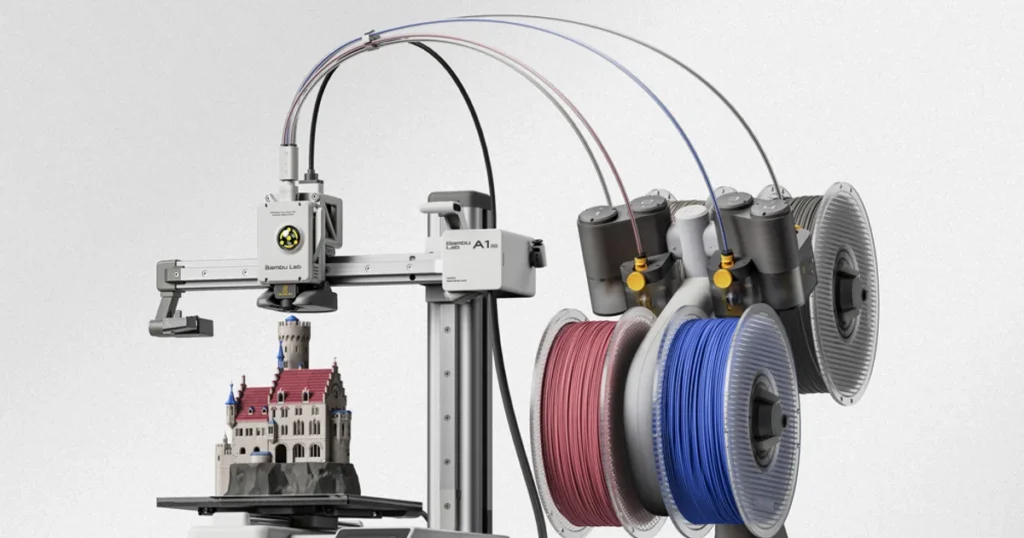
Choosing between the Bambu A1 vs A1 Mini comes down to four primary factors: build volume, workspace footprint, total budget, and your planned projects.
Both machines share identical core motion technology, standardizing high-speed printing, active flow compensation, and automated bed leveling across the entire bed-slinger line. Consequently, choosing between the Bambu Lab A1 vs A1 Mini is less about print speed or print quality differences and more about how much physical space you need on the build plate.
If you plan to produce large helmet prop sections or batch print functional parts, the standard A1 offers the capacity required for those jobs. Conversely, if your goals involve tabletop miniatures, small replacement parts, or fitting a 3D printer onto a crowded desk, the Bambu Lab A1 Mini vs A1 debate shifts heavily toward the smaller unit.
Below, we break down exact manufacturer specifications, practical testing observations, and hands-on performance metrics to help you determine which printer delivers maximum value for your specific workflow.
Related: Bambu Lab X2D vs P2S: Differences, Specs & Which Is Better?
Bambu Lab A1 vs A1 Mini: Quick Comparison
Evaluating the Bambu Lab A1 vs A1 Mini specs reveals that both models share the majority of their internal electronics, sensor arrays, and hotend architecture. The primary physical variance rests in the physical frame dimensions, total machine weight, and maximum heated bed temperature.
| Specification / Feature | Bambu Lab A1 | Bambu Lab A1 Mini |
| Build Volume (W × D × H) | 256 × 256 × 256 mm | 180 × 180 × 180 mm |
| Physical Dimensions | 385 × 410 × 430 mm | 347 × 315 × 365 mm |
| Net Weight | 8.3 kg | 5.5 kg |
| Max Toolhead Speed | 500 mm/s | 500 mm/s |
| Max Acceleration | 10,000 mm/s² | 10,000 mm/s² |
| Max Hotend Temperature | 300 °C | 300 °C |
| Max Bed Temperature | 100 °C | 80 °C |
| Multicolor Support | Yes (AMS Lite) | Yes (AMS Lite) |
| Chassis Design | Bed Slinger (Linear Rails / Guides) | Cantilever Bed Slinger |
| Default Nozzle | 0.4 mm Stainless Steel | 0.4 mm Stainless Steel |
When evaluating these metrics for an A1 Mini vs A1 comparison, the most significant hardware specifications affecting real-world purchasing decisions are the build volume and the maximum bed temperature limit.
While both printers execute motion at up to 500 mm/s, the larger physical footprint of the A1 demands a larger dedicated bench area. Conversely, the smaller bed thermal ceiling on the A1 Mini limits filament choice when working with specific technical thermoplastics.
Related: Bambu Lab P1S vs P2S: Complete Comparison, Specs, Features, Speed & Is It Worth Upgrading? (2026)
What Is the Difference Between the Bambu Lab A1 and A1 Mini?
Build Volume and Maximum Print Size
The most critical factor in this desktop 3D printer comparison is physical print volume. The Bambu Lab A1 build volume measures 256 × 256 × 256 mm, supplying a total print envelope of approximately 16.7 liters. In contrast, the Bambu Lab A1 Mini build volume measures 180 × 180 × 180 mm, providing roughly 5.8 liters of printable space.
Translating volume calculations into practical printing scenarios reveals structural limitations:
| Printer Model | Print Bed Dimensions | Target Print Capabilities |
| Bambu Lab A1 | 256 × 256 mm | Fits adult wearable masks, full helmet quarters, multi-part trays |
| Bambu Lab A1 Mini | 180 × 180 mm | Fits small tools, single miniatures, compact functional parts |
Asking how much bigger is the A1 than the A1 Mini reveals a total usable build volume nearly three times greater on the standard model. You can sliced model files horizontally or vertically to fit smaller plates, but printing large items on smaller machines requires extra assembly time, sanding, and structural gluing.
Print Speed and Print Quality
Evaluating A1 vs A1 Mini print speed shows that both machines share identical factory limits: a maximum toolhead travel speed of 500 mm/s alongside acceleration peaks of 10,000 mm/s². Does Bambu Lab A1 print faster than A1 Mini in daily operation? In real-world tests, both machines finish single small models within minutes of each other because short print paths rarely allow either toolhead to reach maximum velocity.
Regarding A1 vs A1 Mini print quality, both systems use active flow compensation via eddy current sensors in the toolhead alongside automated resonance calibration. These features eliminate ghosting, ringing, and inconsistent extrusion across both frames. However, object geometry, overhang angles, slice layer heights, and cooling speed exert far greater influence over final visual quality than the differences between the motion systems themselves.
Heated Bed and Material Compatibility
Comparing A1 vs A1 Mini bed temperature reveals a key hardware difference. The Bambu Lab A1 reaches 100 °C on its heated bed, whereas the A1 Mini tops out at 80 °C. This hardware cap creates distinct boundaries for A1 vs A1 Mini filament compatibility.
- PLA, TPU, and PETG: Both machines handle these standard materials cleanly using stock open-frame settings.
- ABS and ASA: Neither open-frame machine actively retains chamber heat. Warping on long thin prints remains common on open bed slingers, but the A1 Mini’s 80 °C bed cap further restricts adhesion for these high-temperature filaments.
- Engineering Composites: While both hotends reach 300 °C and support hardened steel nozzle swaps, ambient draft exposure on open-bed frames makes printing nylon or polycarbonate unfeasible for high-stress structural parts.
For reliable production with warping-prone engineering materials, enclosed corexy systems are significantly better suited than open bed-slinger designs.
Multicolor Printing and AMS Lite
Both machines support multi-material capabilities via the A1 vs A1 Mini AMS Lite setup. The AMS Lite mounts alongside either printer, feeding up to four spools directly into a four-way hub located above the toolhead.
Can Bambu Lab A1 and A1 Mini print multicolor? Yes, both machines offer smooth filament switching, automatic spool identification through RFID, and active tension control. Choosing an A1 vs A1 Mini multicolor printing workflow depends on available tabletop width. Purchasing a standalone printer allows single-color operation, but buying the machine bundled with the AMS Lite reduces initial hardware costs compared to purchasing the multi-material unit separately later.
Size, Weight, and Workspace
Evaluating A1 vs A1 Mini dimensions and A1 vs A1 Mini weight highlights workspace layout trade-offs. The standard Bambu Lab A1 FDM 3D printer weighs 8.3 kg and occupies 385 × 410 × 430 mm of physical space, requiring extra clearance behind and in front of the machine to allow full travel of its 256 mm bed.
The Bambu Lab A1 Mini FDM 3D printer uses a cantilever design, weighs 5.5 kg, and features a compact 347 × 315 × 365 mm footprint. This smaller footprint makes it a viable compact 3D printer for beginners who want to operate their machine on a standard study desk or bookshelf alongside computer monitors.
Bambu Lab A1 vs A1 Mini: Price and Value
Pricing models vary across regional distributors, but baseline manufacturer retail pricing maintains a clear tier gap. Evaluating the standard Bambu Lab A1 vs A1 Mini price reveals that the full-sized A1 generally costs approximately $100 to $150 more than the entry-level A1 Mini.
When comparing AMS Lite standalone bundles, buying the multi-material system packed directly with either printer saves significant capital over ordering the unit as an add-on accessory later.
To calculate real value between these setups, evaluate your immediate workspace limitations alongside project scopes. If your printing goals center on small desktop accessories, tabletop miniatures, or small functional brackets, the lower cost of the smaller unit makes the A1 Mini worth buying for budget-conscious creators. However, if you plan to print large items like helmets, organizers, or multi-component assemblies, spending the extra funds on the standard model avoids the labor required to split, align, and join smaller printed sections.
Related: Full Color 3D Printing Services: Technologies, Pricing & Design Guide (2026)
Which Is Better for Different 3D Printing Projects?
| Project Selection Criteria | Recommended Printer | Suitable Applications & Examples |
| Fits within 180 mm³ | Bambu Lab A1 Mini | Tabletop miniatures, small tools, desk accessories, replacement parts |
| Exceeds 180 mm³ | Bambu Lab A1 | Large props, cosplay helmets/armor, functional organizers, batch production |
Small Models, Miniatures, and Everyday Prints
For creators focused on tabletop gaming, desk organizers, or replacement household brackets, the smaller bed size is rarely a bottleneck. A compact machine easily prints tabletop terrain pieces, custom phone stands, and utility clips. As a dedicated 3D printer for miniature models, the A1 Mini offers crisp surface detail and high layer accuracy at a lower initial cost
Large Models, Prototypes, and Functional Parts
Projects involving larger dimensions present clear operational boundaries. A full-sized 3D printer for cosplay models must fit broad geometric shapes, including facemasks, armor plates, and structural prop bases. Attempting to fit these items onto smaller build plates requires slicing models into multiple pieces, increasing assembly time and reducing structural strength along bonded seams.
When choosing a 3D printer for functional parts or a reliable 3D printer for batch production, the larger bed on the A1 allows operators to lay out dozens of small parts on a single plate, running long overnight print cycles with fewer manual resets.
Related: 10 Best Resin 3D Printers in 2026: Tested Picks for Every Budget
Beginners and First-Time 3D Printer Buyers
When deciding which Bambu Lab printer is best for beginners, both models offer reliable out-of-box operation. Both feature fully automated nozzle offset calibration, vibration compensation, and simplified spool loading routines.
First-time buyers constrained by tight physical spaces or conservative budgets will find the A1 Mini exceptionally approachable. However, buyers looking for long-term versatility across varied project sizes may prefer the larger standard model to avoid outgrowing their bed volume as their modeling skills evolve.
Bambu Lab A1 vs A1 Mini: Pros and Cons
Bambu Lab A1
Pros:
- Generous 256 × 256 × 256 mm build volume fits large single-piece models.
- 100 °C maximum bed temperature offers broader material flexibility for PETG and specialized filaments.
- Standard dual-rail Z-axis frame structure provides robust long-term stability.
Cons:
- Requires a larger workspace desk footprint to clear full bed movements.
- Higher baseline equipment purchase cost compared to the cantilever design.
Bambu Lab A1 Mini
Pros:
- Compact, lightweight cantilever frame fits onto constrained desks easily.
- Lower purchase price delivers excellent performance-per-dollar value.
- Quiet motor drivers and fast automated setup routines make it highly beginner-friendly.
Cons:
- 180 × 180 × 180 mm build plate limits single-piece helmet and prop construction.
- 80 °C maximum bed temperature restricts high-heat material options.
Should You Buy the A1 or A1 Mini?
Choosing between these two machines depends on your space, budget, and intended project scale:
- Select the Bambu Lab A1 Mini if: You work in a space-constrained environment, print mostly small replacement parts or miniatures, want a low-cost entry point into high-speed FDM printing, or need a compact secondary machine for quick iterative prototypes.
- Select the Bambu Lab A1 if: You plan to build large cosplay helmets, need high-capacity batch production, prefer to avoid splitting 3D models in software, or require 100 °C bed temperatures for wider filament options.
When deciding which is better Bambu Lab A1 or A1 Mini, consider whether your volume requirements justify the higher cost. If you only print massive objects occasionally, using a small desktop printer for everyday parts and outsourcing rare, oversized prints to specialized industrial printing services can keep your home workspace clear while maintaining project flexibility.
Ready to Manufacturing with LAVA3dp?
Upload your CAD file today and receive instant pricing, expert engineering support, fast production, and worldwide delivery.
Get an Instant Quote →Frequently Asked Questions
What is the main difference between the Bambu Lab A1 and A1 Mini?
The primary operational differences lie in build volume, physical footprint, maximum bed temperature, and overall price. The standard A1 features a 256 × 256 × 256 mm print area, a 100 °C maximum bed temperature, and a dual-upright frame. The A1 Mini provides an 180 × 180 × 180 mm print envelope, an 80 °C maximum bed temperature, and a cantilever frame that uses less desk space at a lower price point.
Is the Bambu Lab A1 worth the extra money over the A1 Mini?
Is the Bambu Lab A1 worth the extra money? For users planning to build helmets, large functional organizers, or run multi-part print plates, the extra investment pays off by eliminating the manual work of slicing and joining smaller prints. However, if your projects remain within the 180 mm³ envelope, the A1 Mini delivers identical print quality and speed for less money.
Does the Bambu Lab A1 print faster than the A1 Mini?
Both machines list matching maximum motion specifications: top toolhead travel speeds up to 500 mm/s alongside accelerations up to 10,000 mm/s². In practical tests on small and medium objects, print completion times are nearly identical because both printers use identical toolhead physics and acceleration profiles.
Is the Bambu Lab A1 Mini big enough for most 3D printing projects?
Is the A1 Mini big enough for 3D printing? Yes, the 180 × 180 × 180 mm build area fits the vast majority of everyday utility parts, phone stands, toys, and tabletop gaming miniatures. However, larger projects like full-sized wearable helmets, large prop swords, or wide storage boxes will require splitting files into separate pieces or printing on a full-sized machine.
Do the Bambu Lab A1 and A1 Mini support multicolor printing?
Both models support 4-color multi-material workflows using the external AMS Lite feeder. The AMS Lite mounts next to or on top of the frame, feeding four distinct filament strands through a specialized top-mounted hub directly into the extruder assembly.
Which Bambu Lab printer is better for beginners?
Both systems offer beginner-friendly automated bed leveling, vibration compensation, and simple touchscreen controls. The A1 Mini serves as a best 3D printer for small projects and a compact 3D printer for beginners operating in small rooms. However, the standard model functions well as a best Bambu Lab 3D printer for beginners who want extra build area for future projects without needing to upgrade hardware later.
Can the Bambu Lab A1 and A1 Mini print ABS, ASA, or engineering-grade materials?
While both hotends reach 300 °C and can take hardened nozzles, neither printer features a fully enclosed print chamber. Printing ABS or ASA on open-frame bed-slingers leads to edge warping due to ambient room drafts, and the A1 Mini’s 80 °C bed temperature cap further restricts ABS adhesion. For consistent prints with high-temperature engineering filaments, enclosed machines are much better suited.