

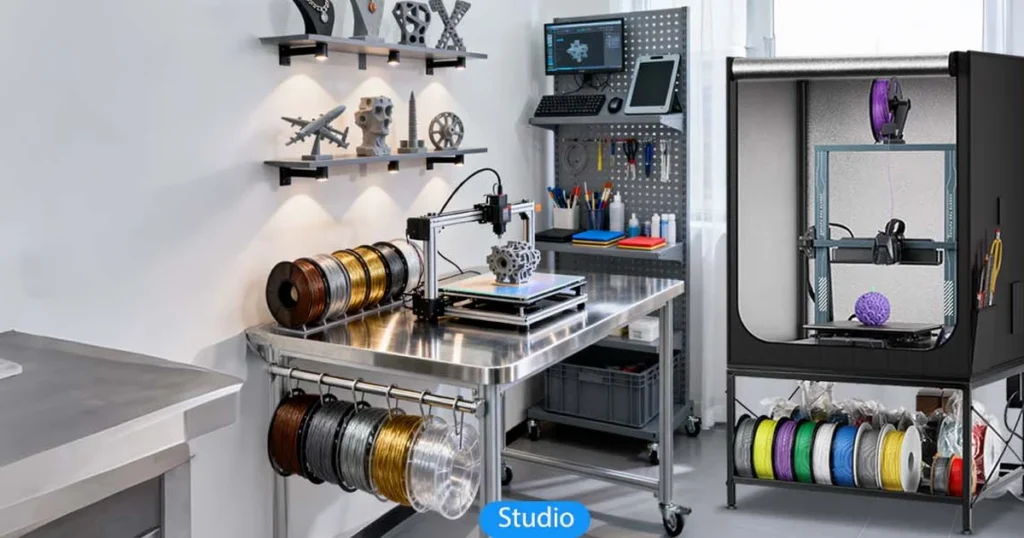
Looking for the ideal setup? Check our top picks for the best 3d printer stand and 3d printer table options to stabilize your rig, eliminate ghosting, and organize your workshop. Explore our guide at LAVA3dp and upgrade your printing setup today!
Setting up a high-speed coreXY machine or a trusty bed-slinger on a wobbly desk leads directly to print artifacts. If your mounting surface flexes during rapid directional changes, your print head shifts out of alignment, creating ghosting, ringing, and layer shifts. A dedicated, rigid surface isolates motion and keeps your machine calibrated.
Buying or building a 3d printer stand involves matching mechanical inertia, vibration dampening, and workshop layout. High-speed units like the Creality K1 or Bambu Lab X1 Carbon generate strong lateral forces that require heavy-duty bracing. Lower-cost bed-slingers like the Ender 3 need a stable platform to maintain bed leveling over multi-day jobs.
This guide breaks down seven top-performing support systems, key evaluation criteria, DIY modifications, and practical workspace organization tips.
Why Your 3D Printer Stand or Table Matters
How an Unstable Surface Affects Print Quality
When stepper motors reverse direction at high speed, inertia transfers straight into the supporting furniture. An unstable platform acts like an accordion, absorbing and reflecting kinetic energy back into the motion system.
This kinetic bounce manifests as mechanical artifacts:
- Ghosting and Ringing: Ripples near sharp corners caused by residual frame resonance.
- Layer Shifts: Sudden physical displacement of layers when aggressive toolhead accelerations overcome low surface friction.
- Dimensional Inaccuracy: Uneven wall thickness across long vertical tall prints due to base sway.
Benefits of a Dedicated 3D Printer Stand
A heavy, purpose-built surface isolates motion. Damping structural vibration keeps input shaping algorithms accurate, resulting in sharper edges and cleaner outer walls.
A dedicated setup also solves workshop clutter. Housing active spools, spare parts, scrapers, and maintenance tools right below the unit cuts down on setup friction and keeps your build volume free of dust and debris.
Who Needs a 3D Printer Table?
Anyone operating a modern FDM or SLA system needs a firm mounting base. Fast multi-color setups, small print farms, hobbyists sharing a home office, and makers working with technical resins all benefit from a rigid foundation. If your current table shakes when you push against the edge with two fingers, your machine needs an upgrade.
Quick Comparison of the 7 Best 3D Printer Stands & Tables (2026)
1. Heavy-Duty Steel Frame Workstation
2. Modular Stackable Cube System
3. Industrial Adjustable Workbench
4. Compact Mobile Metal Cart
5. Enclosed Cabinet Workstation
6. Heavy-Duty Utility Rolling Cart
7. All-In-One Maker Workstation
Related: 10 Best 3D Printers for Schools in 2026 (Classroom-Tested Picks)
Our Selection Process (How We Evaluated These Stands)
We tested each system across six key metrics to ensure high structural stability and workspace utility.
Evaluation Criteria
- Stability & Vibration Control (Weight, Lateral Rigidity)
- Weight Capacity (Frame Gauge, Joint Gussets)
- Build Quality & Materials (Steel vs Wood vs MDF)
- Size & Footprint Compatibility
- Storage & Organization Options
- Value for Money
Stability & Vibration Control
We measured top-plate displacement while operating high-acceleration CoreXY machines at maximum acceleration limits (10,000 mm/s²+). Surfaces that allowed more than 2mm of lateral sway were disqualified.
Weight Capacity
A basic unit must support the base machine, external spool runners, dry boxes, and top-mounted multi-material units (AMS/MMU). We tested frames at double their rated dynamic loads.
Build Quality & Materials
Powder-coated steel frames and thick solid hardwood tops rate highest. Thin hollow-core particleboard panels fail long-term durability checks under continuous vibration.
Size & Compatibility
We looked for surfaces that comfortably fit standard footprint sizes, leaving extra room for external spools, cables, and rear exhaust fans.
Storage & Organization
Units earned bonus points for built-in drawer units, spool racks, cable management loops, and lower shelves for raw material storage.
Value for Money
We evaluated cost against long-term rigidity, ensuring each option delivers performance matching its price bracket.
7 Best 3D Printer Stand & Table Recommendations
Best Overall 3D Printer Stand
This steel-frame unit features thick cross-bracing and a heavy top board that absorbs sharp mechanical vibrations. The open lower shelf holds dynamic dry boxes or heavy filament spools to keep the center of gravity low.
Pros
Solid steel gussets eliminate frame sway.
Deep top plate easily holds modern enclosures and top-mounted filament systems.
Lower shelf lowers overall center of gravity when loaded.
Cons
Requires two adults for easy assembly.
Industrial design might not fit home office decor.
Best For
Makers running fast CoreXY machines like the Bambu Lab X1-Carbon, Creality K1, or Prusa MK4 who need a stable setup.
Best Budget 3D Printer Table
A low-cost, versatile modular option that provides basic support without taking up much room. Its square footprint makes it easy to add custom printed bracing brackets or build a DIY 3d printer enclosure table.
Pros
Inexpensive base option.
Easy to modify, drill, or mount printed accessory brackets onto.
Fits neatly into tight room corners.
Cons
Lightweight construction allows wobble without wall anchors or added mass.
Not suitable for heavy dual-extruder or industrial units.
Best For
Beginners running budget machines like the Ender 3 or Anycubic Kobra who want an affordable, customizable base.
Best Heavy-Duty Workbench for Large 3D Printers
Built with thick tubular steel and a heavy solid hardwood top, this heavy duty 3d printer stand supports large-format machines. Adjustable leg height lets you level your setup perfectly on uneven workshop floors.
Pros
Massive weight capacity handles multi-machine configurations easily.
Height adjustment helps set up comfortable, ergonomic working positions.
Heavy wood top naturally dampens medium-frequency vibrations.
Cons
Takes up significant floor space.
Higher upfront cost.
Best For
Makers running large-format machines like the Elegoo Neptune 4 Max or multiple mid-size printers side-by-side.
Best Compact Stand for Small Workspaces
Designed for tight spots, this compact unit combines a narrow footprint with efficient multi-tier storage. It functions as a flexible 3d printer desk extension or standalone tower for small rooms.
Pros
Small footprint fits into standard bedroom closets or office corners.
Includes built-in cable routing channels along the back frame.
Mid-shelf keeps tools off the primary print surface.
Cons
Narrow base requires light machines to prevent top-heavy tipping.
Limited surface area for external filament dry boxes.
Best For
Students, apartment dwellers, and hobbyists using compact machines like the Prusa MINI+ or Bambu Lab A1 Mini.
Best 3D Printer Stand with Storage
Designed with organization in mind, this option features a 3d printer table with filament storage drawers, sliding tool trays, and side spool brackets. It helps turn messy cables and scattered tools into a clean, unified workspace.
Pros
Enclosed drawers protect active filament spools from ambient room dust.
Keeps scrapers, extra nozzles, and spare bed sheets organized.
Clean visual finish conceals cables and power supplies.
Cons
Drawer hardware requires detailed assembly.
Slightly lower weight rating than open steel workbenches.
Best For
Makers who want a clean, organized 3d printer storage cabinet system for tools and raw materials.
Best Mobile Rolling 3D Printer Cart
Built around heavy-duty locking casters, this rolling stand for 3d printer setups lets you easily roll your machine out for servicing and back into place when printing. Threaded leveling pads lock the wheels solidly in place to stop movement during fast prints.
Pros
Rolls smoothly for easy access to rear exhaust ports, motors, and wiring.
Locking wheel bases prevent wobble during operation.
Open frame design allows simple installation of custom air filtration units.
Cons
Caster wheels introduce a potential flex point if not fully locked down.
Requires a flat, even floor for maximum stability.
Best For
Dynamic workshops and educational labs that need flexible equipment positioning.
Best Premium 3D Printing Workstation
This top-tier 3d printer workstation features integrated overhead LED light bars, dedicated power distribution strips, pegboard side panels, and rubber-isolated top plates. It offers a complete, professional solution for high-volume printing.
Pros
Integrated electronics layout reduces cable clutter.
Aluminum T-slot frames allow easy mounting of custom accessories.
Built-in power conditioning shields sensitive electronics from line noise.
Cons
Premium pricing.
Large footprint requires dedicated floor space.
Best For
Professional rapid prototyping labs and active print farm managers who need maximum workspace utility.
Related: 10 Best 3D Printers for Small Businesses to Start Making Money in 2026
Best 3D Printer Stand by Printer Brand
Different motion setups produce different mechanical forces. Matching your machine to the right stand style helps optimize print performance.
| # | Printer Type | Frame Requirement |
|---|---|---|
| 1 | Fast CoreXY (Bambu Lab, Creality K1) | Heavy Steel Frame + Mass Dampening |
| 2 | Standard Bed-Slinger (Ender 3, Prusa) | Rigid Wood/Steel Base + Wide Footprint |
| 3 | Large Format (Neptune Max, Kobra Max) | Deep Industrial Workbench (24″+ depth) |
Best Stand for Bambu Lab Printers
Bambu Lab machines generate strong lateral forces during high-speed directional changes. The best table for Bambu Lab X1 Carbon and the best table for Bambu Lab P1S features a heavy steel frame paired with a high-density top plate. Mass dampening is key here; adding extra weight down low stops fast directional changes from shaking the entire frame.
Best Table for Creality Ender Series
The Creality Ender 3 line uses a bed-slinger design where the print bed moves along the Y-axis. The best table for Ender 3 setups needs a wide, stable base that absorbs bed acceleration forces. The best table for Creality K1 requires high frame rigidity to withstand fast toolhead changes without introducing ring artifacts.
Best Workbench for Prusa Printers
Prusa i3 and MK4 units thrive on rigid wood or heavy steel platforms. Adding rubber isolation feet beneath the stand stops motor noise from transferring into surrounding floorboards, ensuring a quiet workspace.
Best Stand for Anycubic Printers
Anycubic machines range from compact resin units to large-format FDM printers. Choose a stand with an easy-to-clean top plate to handle resin drips or large plastic prints without staining.
Best Table for Elegoo Printers
Elegoo Mars and Saturn resin printers need a level, chemically resistant table, while their Neptune FDM series benefits from a deep workbench that supports long bed travel along the Y-axis.
How to Choose the Best 3D Printer Stand or Table
Structural Mass & Rigidity (Steel vs MDF)
Dimensional Clearance (Enclosures, Filament Buffers)
Vibration Dampening Mechanics
Workspace Ergonomics & Cable Routing
Weight Capacity Requirements
Always calculate total static and dynamic weight before buying:
Table Size & Surface Area
Ensure the table top extends at least 3-4 inches beyond your printer frame on all sides. This extra clearance leaves room for rear bed cable clearance, side spool mounts, and front-mounted control screens.
Material (Steel vs Wood vs MDF)
Steel Frame: Offers high structural rigidity and long-term frame stability.
Solid Wood: Naturally dampens dynamic resonance and holds screws securely.
MDF Board: Provides a flat, dense surface at a budget-friendly price, though edge moisture protection is necessary.
Vibration Dampening
A sturdy table should damp vibrations naturally rather than bouncing them back. Combining heavy steel frames, thick wood tops, and dampening isolation pads creates an effective barrier against mechanical resonance.
Height & Ergonomics
Opt for a work surface height between 30 and 36 inches. This range lets you easily monitor prints, change nozzles, and clean print beds without bending over awkwardly.
Storage Drawers & Shelves
Integrated drawers keep delicate nozzles, scrapers, and bed plates safe from dust and debris while freeing up main surface area.
Cable Management
Built-in grommets, cable tracks, and rear cutouts simplify wiring layouts, reducing snag hazards and accidental disconnections.
Mobility (Fixed vs Rolling Stand)
Fixed workbenches offer maximum frame stability. However, if you need to roll your rig around, pick a stand with high-grade locking casters and threaded leveling feet.
Future Upgrade Considerations
Select a surface larger than your current setup needs. Leaving extra space allows room for future multi-material add-ons, dry boxes, and protective draft enclosures.
Related: 10 Best Resin 3D Printers in 2026: Tested Picks for Every Budget
Recommended Dimensions for a 3D Printer Table
| Printer Type | Recommended Top Surface Area |
|---|---|
| Desktop (Prusa Mini, A1 Mini) | 20″ x 20″ minimum |
| Mid-Size (Ender 3, Bambu P1S) | 24″ x 24″ minimum |
| Large-Format (Neptune 4 Max) | 36″ x 30″ minimum |
Desktop (Prusa Mini, A1 Mini)
Mid-Size (Ender 3, Bambu P1S)
Large-Format (Neptune 4 Max)
Desktop Printers
Compact machines with print beds under 180mm require a table area of at least 20″ x 20″ to leave room for external power supplies and basic cable routing.
Mid-Size Printers
Standard machines with 220mm–256mm build plates need at least 24″ x 24″ of space. This provides enough room for top-mounted material systems, rear exhaust ports, and side spool holders.
Large-Format 3D Printers
Large machines with 300 mm²+ build plates require a deep surface measuring at least 36″ W x 30″ D. The extra depth accommodates full front-to-back bed travel without hitting back walls.
Common Mistakes When Choosing a 3D Printer Stand
Avoid these common mistakes to protect your print quality and keep your hardware safe:
- Using Lightweight Furniture: Hollow-core tables act like acoustic soundboards, amplifying motor noise and allowing severe frame sway during fast directional changes.
- Ignoring Maximum Load Capacity: Overloading a low-cost table causes top surface sagging, which throws off bed leveling and compromises print quality over time.
- Choosing an Uneven Surface: A warped top plate introduces frame twist, leading to persistent leveling errors and early rail wear.
- Overlooking Vibration Issues: Fast accelerations on rigid, un-damped surfaces create severe surface ringing on finished parts.
- Insufficient Ventilation Space: Placing a printer directly against walls blocks heat dissipation and air intake, causing thermal control issues on long jobs.
- Poor Cable Organization: Loose wires hanging behind the table can catch on moving beds or axis stepper motors, leading to print failures.
Related: Best Budget 3D Printers in 2026: Affordable Options for Every Maker
How to Reduce 3D Printer Vibrations
Isolating kinetic energy keeps your printer quiet and stops vibration artifacts from showing up on your prints.
Anti-Vibration Pads
Placing thick Sorbothane or neoprene pads under your table legs absorbs high-frequency vibrations before they reach your floorboards.
Concrete Paver Method
Place a heavy 16×16 inch concrete paver on top of a dense rubber pad, then set your printer directly on the stone. The high structural mass of the stone absorbs dynamic kinetic energy, eliminating vibration ghosting.
Rubber Isolation Feet
Replace standard hard plastic machine feet with flexible TPU or soft rubber feet to damp motor frequencies right at the frame level.
Reinforcing the Table
Add steel diagonal cross-bracing or bolt your table frame to wall studs to eliminate horizontal table sway.
Proper Printer Maintenance
Keep your motion system running smoothly. Clean linear rails, check belt tension, and calibrate input shaping regularly to reduce unnecessary mechanical vibrations.
DIY 3D Printer Stand Ideas
IKEA LACK Table Setup
The classic IKEA table for 3d printer setup uses two or three stacked LACK units joined with 3D-printed leg couplers. Reinforcing the leg joints with printed corner braces helps stiffen the lightweight frame.
DIY Wooden Workbench
Build a strong, custom-sized workbench using standard 2×4 lumber frames topped with a thick 3/4-inch plywood sheet. This approach delivers solid rigidity at a fraction of the cost of commercial workbenches.
Metal Frame Workstation
Assemble a rigid frame using 2040 T-slot aluminum extrusions. T-slot rails make it easy to attach custom mounts, side panels, and tool racks anywhere along the frame.
Modular Shelving Solution
Convert heavy-duty wire garage shelving units into a multi-tier printer rack. Adding thick wood or MDF insert plates to the wire shelves creates flat, stable surfaces for your machines.
Related: 3D Printed Beyblade: How to Design, Print, and Battle Like a Pro
Essential Accessories for a Complete 3D Printing Workstation
Elevate your basic table into an efficient, fully-featured setup with these additions:
Tool Organizer
Mount magnetic racks nearby to keep scrapers, flush cutters, hex keys, and spare nozzles within reach.
LED Lighting
Install bright overhead LED strips to light up your build plate for easy visual monitoring and time-lapse recordings.
Power Strip & Cable Management
Use surge-protected power strips with integrated USB ports to safely power your printer, control boards, and lighting systems.
Fire Safety Equipment
Mount compact, automatic fire suppression balls inside your enclosure for added peace of mind during overnight prints.
Noise Reduction Solutions
Line enclosure interiors with acoustic foam dampening panels to lower operating noise during late-night jobs.
Best 3D Printed Accessories for Your Printer Stand
Tailor your workspace layout by printing these functional organizing upgrades:
- Cable Clips: Route motor wires, power cords, and bowden tubes cleanly along your frame legs to prevent snags.
- Filament Holder: Print custom low-friction spool rollers fitted with smooth ball bearings to reduce extruder pull strain.
- Tool Rack: Print custom bracket holders designed to snap onto your workbench frame legs for quick access to tools.
- Drawer Organizers: Divide wide workbench drawers into neat compartments to store spare nozzles, thermistors, and screws.
- Spool Mounts: Print strong overhead frame hooks to feed material smoothly straight down into your extruder.
- Camera Mounts: Secure webcam brackets onto your workbench frame to capture stable, vibration-free print time-lapses.
- Anti-Vibration Feet: Print flexible TPU dampening feet to absorb low-frequency motor vibrations right at the source.
Related: Filament Dryers for PLA, PETG, ABS, TPU, and Nylon (2026 Guide)
3D Printer Stand vs Workbench vs Desk
Primary Focus
Vibration Isolation
Cost
Footprint Efficiency
Recommended For
Maintenance Tips for Your 3D Printer Table
Keep your base stable and long-lasting with routine checks:
- Routine Cleaning: Wipe down top surfaces weekly with isopropyl alcohol or mild cleaners to remove plastic scrap particles, dust, and oil residue.
- Checking Stability: Inspect and tighten frame bolts, corner gussets, and leg levelers monthly to catch any looseness caused by motor vibration.
- Preventing Rust & Wear: Coat exposed steel frames with protective powder sprays and seal unfinished wood surfaces to prevent moisture warping.
- Organizing Tools & Filaments: Clear loose tools off the primary print table regularly to keep the area tidy and avoid accidental cable snags.
Why Choose Lava3DP for Professional 3D Printing Services
When your projects outgrow home desktop setups or require advanced industrial materials, partnering with an industrial service provider bridges the gap. Lava3DP provides commercial-grade production capabilities directly through an easy-to-use digital platform.
Industrial-Grade 3D Printing Technologies
Get access to high-end industrial systems including Selective Laser Sintering (SLS), Direct Metal Laser Sintering (DMLS), Stereolithography (SLA), and high-speed industrial FDM. These processes produce fully dense, high-precision parts without the structural limits of desktop setups.
Wide Range of Materials
Choose from a broad selection of technical materials, including carbon-fiber reinforced nylons, medical-grade resins, high-temp PEEK, and stainless steel or aluminum alloys.
Fast Online Instant Quotes
Upload your CAD models directly to the online portal to get instant quotes, automated design-for-manufacturability (DFM) feedback, and lead-time estimates in seconds.
Rapid Prototyping & Production Parts
Whether you need a single prototype to check form and fit or full-scale production runs, advanced industrial workflows deliver consistent part quality with fast turnaround times.
Global Manufacturing & Shipping
Rely on dependable global logistics, strict quality control standards, and fast doorstep delivery worldwide.
Related: Bambu Lab P1S vs P2S: Complete Comparison, Specs, Features, Speed & Is It Worth Upgrading? (2026)
Final Thoughts: Which 3D Printer Stand Is Right for You?
Upgrading from a wobbly desk to a rigid 3d printer stand is one of the easiest ways to improve your print quality. Isolating motion, dampening vibration, and keeping your workspace organized eliminates ringing artifacts, prevents layer shifts, and makes day-to-day printing far more enjoyable.
Select a heavy steel workbench if you run fast CoreXY machines, opt for a compact rolling cart if you work in a small room, or build a reinforced DIY wooden platform to fit your exact budget. Matching your table’s stability to your machine’s acceleration limits ensures clean, consistent print results on every job.
Ready to Manufacturing with LAVA3dp?
Upload your CAD file today and receive instant pricing, expert engineering support, fast production, and worldwide delivery.
Get an Instant Quote →Frequently Asked Questions
What is the best stand for a 3D printer?
The best stand features a heavy steel frame, a dense wood or MDF top plate, and diagonal cross-bracing. Heavy workbenches and reinforced steel carts isolate kinetic energy best, preventing frame sway during rapid directional changes.
Does a 3D printer need a dedicated table?
Yes. Placing a machine on a shared or flexible desk transfers motor vibration into the surface, creating print artifacts like ghosting and layer shifts. A dedicated, rigid platform isolates these forces for cleaner prints.
How much weight should a 3D printer table support?
A good table should support at least 150 to 200 lbs for standard desktop setups. For heavy multi-printer arrays or large-format machines, choose an industrial workbench rated for 500 lbs or more.
Can I use an IKEA table for a 3D printer?
Yes, but you should reinforce it first. Standard IKEA LACK tables use lightweight hollow-core board that amplifies vibration noise. Adding 3D-printed leg brackets, wall anchors, or a heavy concrete paver block on top helps stabilize the frame.
How do I stop my 3D printer from shaking the table?
Place a heavy 16×16 inch concrete paver over a dense rubber isolation pad directly beneath your printer. The added mass absorbs dynamic kinetic energy, stopping vibrations from reaching the table legs.
What is the ideal height for a 3D printer stand?
The ideal height ranges between 30 and 36 inches. This height lets you easily check build plates, run maintenance, and clean print beds without straining your back.
Is a rolling cart suitable for a 3D printer?
Yes, as long as it uses heavy-duty locking casters and threaded leveling pads. Locking the base down prevents rolling or swaying during high-acceleration toolhead changes.
What material is best for a 3D printer table?
Powder-coated steel frames paired with thick solid hardwood or high-density MDF tops offer the best performance. The steel provides structural rigidity, while the dense wooden top naturally absorbs mechanical motor noise.